Make the graph move.
Adjust a curve, plot a shape, or explore a transformation. Use separate practice values to see how the idea works.
Interactive graphs & coordinate shapes Math Lens.Getting started
 YOUR MATH REFERENCE, RIGHT BESIDE YOU
A clearer view of the graph. The formula you were looking for. The word that finally clicks. All alongside your online math lesson.
Explore Math LensA free Chrome extension · Store release coming soon
One idea. A whole family of graphs.
THREE TOOLS. ONE CLEARER PICTURE.
Math Lens recognizes supported lesson topics and brings the relevant concepts into Chrome’s side panel.
Adjust a curve, plot a shape, or explore a transformation. Use separate practice values to see how the idea works.
Interactive graphs & coordinate shapesBrowse lesson recommendations or search the library. Open a reference note for meaning, guidance, and a practice example.
Searchable formulas & illustrated notesLook up the vocabulary behind the question, with definitions and common mix-ups explained in plain language.
Vocabulary & common mistakes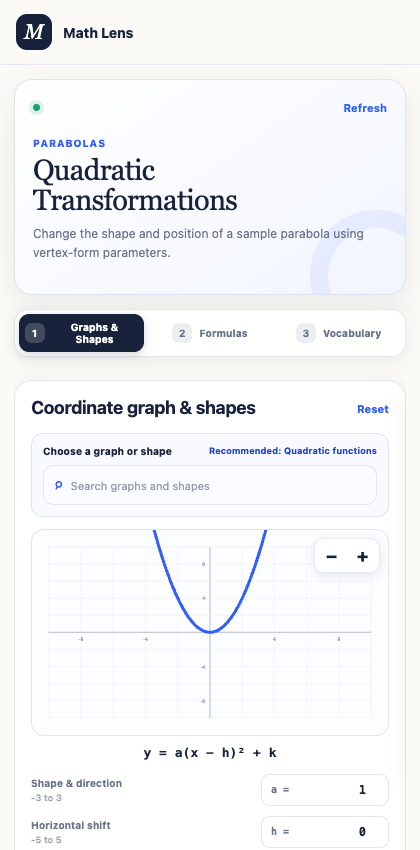
Recommended references follow the lesson. Your graph controls stay in place while the same lesson preset is active.
Explore the wider library whenever you need a different perspective.
Actual extension interface · example lessonTHOUGHTFULLY BUILT FOR LEARNING
Math Lens doesn’t fill answer boxes, choose responses, or submit your work. Graphs begin with separate practice values, never numbers copied from your question.
Lesson matching and reference tools run on your device. No AI service, API key, or Math Lens account is needed.
Read our privacy approachYour school may need to allow the extension. Follow your teacher’s rules, especially during assessments.
A SMALL ADDITION TO YOUR WORKSPACE
Chrome Web Store release coming soon.
Setup & supportOnce the store listing is live, install the extension. On a managed Chromebook, ask your school administrator if installation is blocked.
Open Math Lens beside a DeltaMath or Khan Academy math lesson. Both work automatically. On other pages, highlight a math term and use the right-click lookup.
Move between graphs, formulas, and vocabulary. Use search anytime, even if a lesson hasn’t been recognized.